
The whole tenancy, from the lease you draft to the renewal you send.
Capture the terms, mint an 8-character tenant invite in the same flow, then run rent rises, inspections and renewals from one lease hub.

LORDLY turns lease setup into a single pass: enter the type, dates, rent, bond and special conditions, then mint and send an 8-character tenant invite before you leave the screen. From there every lease has its own hub: increase the rent, schedule an inspection, renew or serve a notice in a tap, with a break-even calculator to weigh a renewal against the cost of sitting vacant. Creating a lease, inviting your tenant and the 90/60/30-day lease-expiry reminders are all free — entitlement.ts grants that cadence at minTier free, as a legal duty rather than a premium extra.
The lease and the invite, in one pass
Enter the lease type (fixed or periodic), the start and end dates, the rent and how often it’s paid, the bond, and any special conditions. LORDLY saves the tenancy and, in the same flow, mints an 8-character invite code for your tenant. Add their email and we send it for you; leave it blank and you get a code to share by SMS, WhatsApp or in person. The moment they sign up and enter it, they’re linked to this exact lease and it activates.
One hub for the life of the tenancy
Every lease opens to its own hub: the terms, the rent, the bond and its lodgement status, and the key dates (next inspection, next rent review and expiry) all in one view. Action tiles let you increase the rent, schedule an inspection, renew the lease or serve a notice without hunting through menus. A compliance panel spells out what your state requires (notice periods, inspection limits and where the bond must be lodged) so nothing is served a day too late.
Renew with the numbers in front of you
When a lease nears its end, the renewal screen lays your three moves side by side: renew at the current rent, renew with an increase, or don’t renew and relist. A built-in break-even calculator weighs the extra rent against the real cost of going vacant (lost weeks plus re-leasing) and tells you how many weeks an increase takes to pay for itself. Send the offer as a LORDLY message to your tenant; the formal notice is generated ready for you to serve, never signed inside the app.
Exactly where it lives.
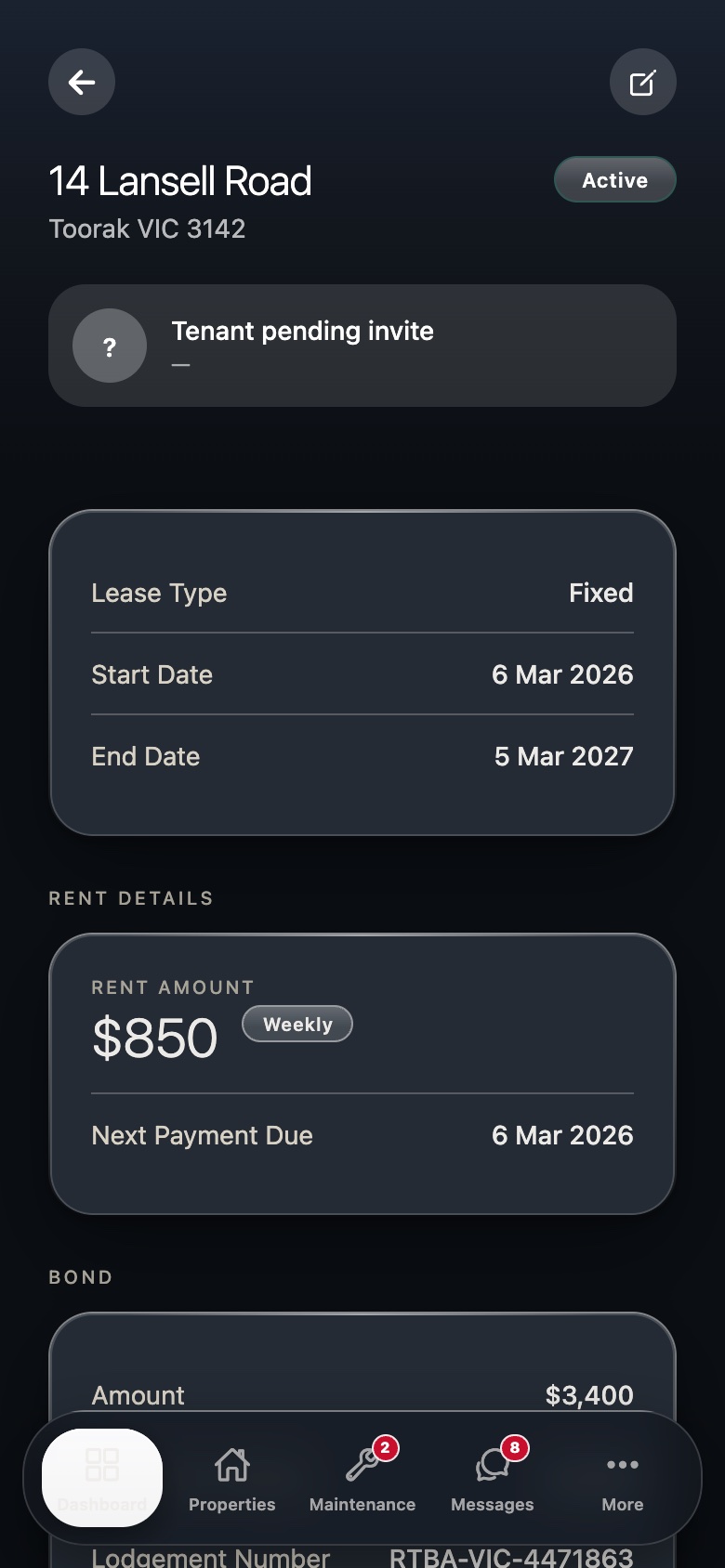
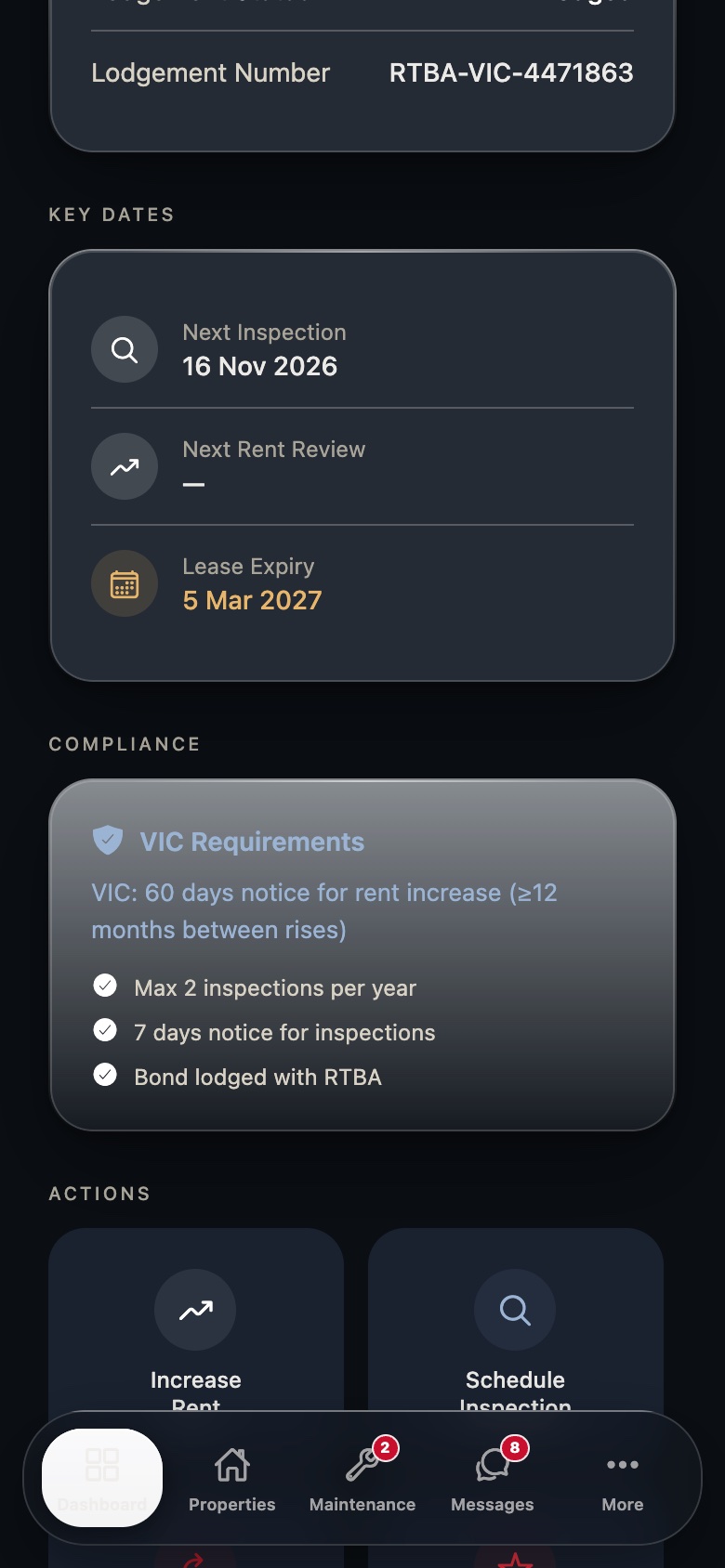
Real LORDLY app screens · demo portfolio shown · yours once signed in.
From start to done.
- 1Open the property and add a leaseFrom the property, tap Add Lease. Choose fixed or periodic, then enter the start and end dates.
- 2Set rent, bond and conditionsEnter the rent amount and frequency, the bond (with a state max-bond hint), and any special conditions.
- 3Invite your tenantAdd their email to send the invite automatically, or save without one to share the 8-character code by SMS, WhatsApp or in person.
- 4They join, the lease activatesWhen your tenant signs up and enters the code, they link to this lease and it flips from draft to active.
- 5Manage it from the hubUse the lease hub to increase rent, schedule an inspection, renew or serve a notice, each with the right guidance for your state.
In the app and on the desktop.
- Create a lease and invite a tenant in one flow
- Share or copy the invite code from the success screen
- Lease hub tiles: rent rise, inspection, renewal, notice
- Break-even calculator built into the renewal screen
- See every lease with its status and expiry in one list
- Open a tenancy’s full terms, bond and key dates on a wide screen
- Track which invites are still waiting to be accepted
- Spot leases expiring in the next 90 days at a glance